Automated Workflow
Soon after the acquisition of Candidate ID, a project was initiated to integrate the marketing automation features from candidate ID into the iCIMS CRM. At that point in time, this work consisted primarily of front end design carried out by an external design agency alongside input from the CRM’s product management team. It also included consultation with the Candidate ID CSM team around features and functionality.
This design project concluded in September 2022, with the external agency’s involvement ceasing at that time. With the recent announcement of CXM for 2024 release, we were asked to re-visit, examine and come to a conclusion about the viability of existing designs for CRM integration, with proposed design solutions for any areas we deemed to not meet the requirements of iCIMS’s vision for CXM.
the challenge
Bringing two applications together while maintaining feature parity. Ensuring that the design is in line with the target persona’s expectations and abilities, ensuring that pattern and layout deviations aren’t too extreme.
the Objective
Improve adoption, satisfaction and perceived value for new CXM users, and existing CRM/MA users with a move to CXM.
the solution
Research and design new experiences for both the workflow automation tool and engagement score management.
Research
I used three sources for research purposes, anonymous usage data from the “Marketing Automation” application, which is the existing marketing automation product for iCIMS customers, user interviews with current MA users as well as current CRM users alongside competitor research focusing on Mailchimp & Hubsopt. Its worth noting that this research was carried out for a holistic review of the entire Recruitment Marketing / Sourcing user experience.
Competitor research
The competitor research was carried out to identify features and patterns and not focused on branding.

Marketing automation findings (Quantitative)
My objective in examining this data was to get an understanding of current user behaviors. What I discovered was;
- Out of the 20+ automation nodes available, only 2 were ever used Send Email (Action) & Check for email open (Condition).
- Almost all automations were setup to send a single email with very few utilising the automated nature of the product
- Engagement scoring was different for every customer, indeed for every user, meaning no consistency of scoring across MA customers and even within a single clients setup.
USER INTERVIEWS (QUALITATIVE)
I, along with the product team conducted interviews with 10 marketing automation customers, focusing on their experiences with the application, particularly their usage of the workflow builder and engagement scoring. The interviews revealed key usability issues aligned with several of Jakob Nielsen’s 10 usability heuristics:
Visibility of System Status: One customer mentioned, “I find the workflow builder intimidating, just worried I’ll break something or send the wrong email to 10k people.” This highlights the lack of clear system feedback during critical moments, leaving users unsure about the impact of their actions.
Recognition Rather than Recall: “I just use it to send newsletters, I know it does more and it was explained, but the person who understood it best has left.” This speaks to the difficulty users face when they need to rely on memory instead of intuitive cues in the system. The platform fails to make the most essential features easily visible or accessible.
Error Prevention: “Engagement scores seem useful, but they don’t seem to ever go down, how can someone be constantly engaged?” This suggests that the design isn’t providing enough checks or clarity around how engagement is calculated, leading to confusion and potential errors in interpretation.
Flexibility and Efficiency of Use: “It constantly crashes when the journey gets too complex.” This comment demonstrates a lack of flexibility, as the tool can’t handle more advanced workflows without crashing, limiting users’ ability to scale their processes.
Help and Documentation: “I only ever duplicate, never start new. I don’t really know how to use it TBH.” This reinforces the need for better in-context help and guidance, as users don’t have the necessary documentation or help within the app to confidently explore features beyond their immediate knowledge.
NOTABLE TRENDS WITH THE INTERVIEWEES WERE:
Lack of Basic Skills: Many users lacked recruitment marketing knowledge, highlighting the Match Between System and the Real World heuristic—there was a disconnect between user terminology and the app’s technical language.
Engagement Scoring Confusion: Users didn’t understand how to properly use engagement scoring, reflecting an issue with Visibility of System Status—the app doesn’t adequately inform users about the scoring mechanism.
Limited Automation Usage: Users mainly sent job-specific promotional emails and newsletters, showing that the automation capabilities were out of their grasp. This indicates a Consistency and Standards issue, where users expect similar behavior across tools but don’t experience it here.
Knowledge Transfer Gaps: When the trained individual left, app usage declined due to a lack of Help and Documentation in the application.
CSM Challenges: The CSMs lacked marketing expertise, and therefore couldn’t assist clients in setting up significant automations, pointing to a gap in User Control and Freedom where users need more guidance and flexibility to solve their own issues.
Needs
- To send emails around jobs and culture.
- To use automation to make their working lives easier.
- To understand more about recruitment marketing.
- To understand the level of engagement across touch points.
Pains
- Unstable application, crashes frequently.
- No access to their ATS data.
- No way to filter out current candidates.
- The builder UI is very hard to understand.
- Engagement scoring is a mess.
Desires
- Templates
- In app knowledge and strategies around recruitment marketing.
- Simplified UI for editing workflows.
- Less admin and setup around engagement tracking.
SYNTHESIS
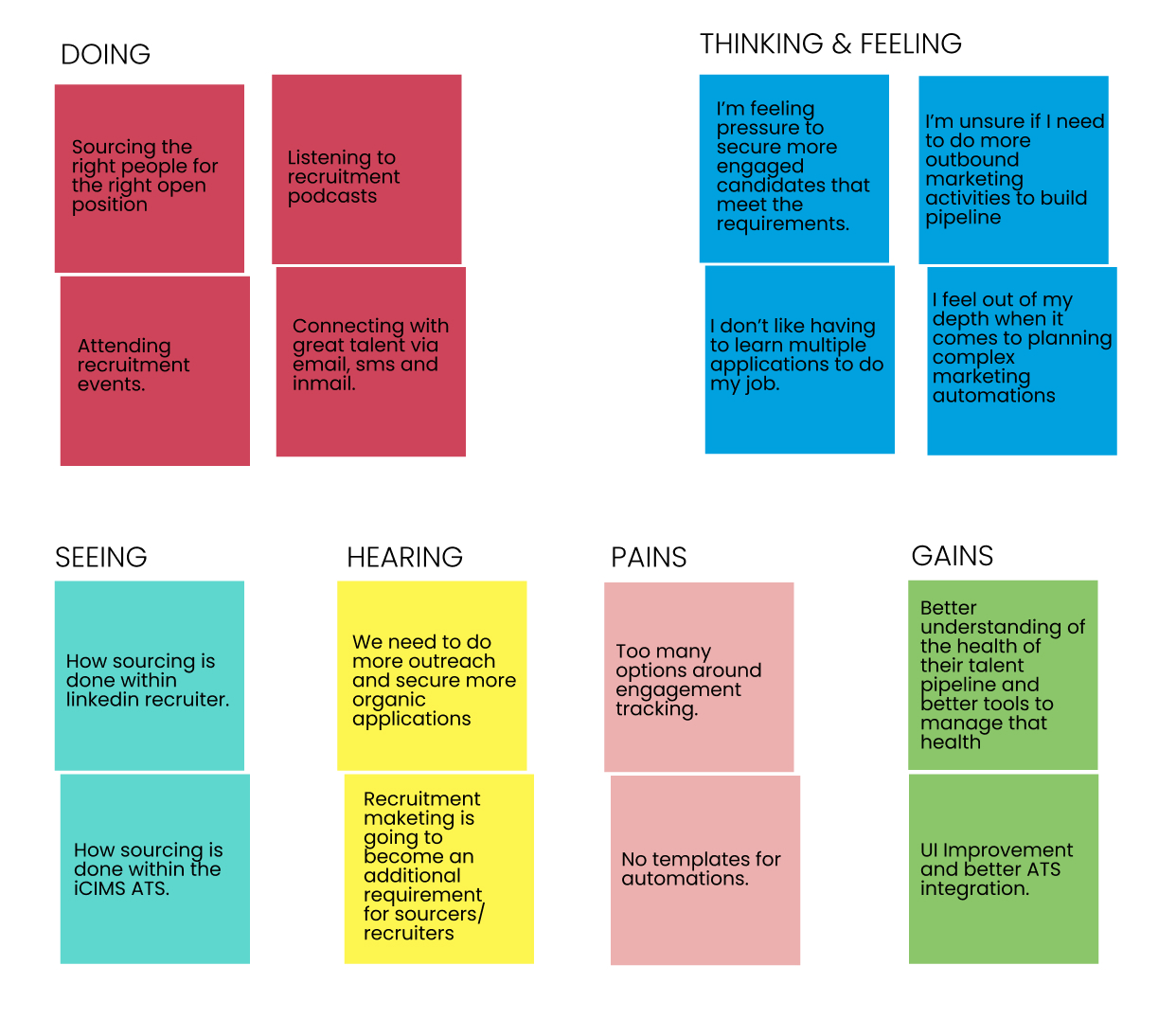
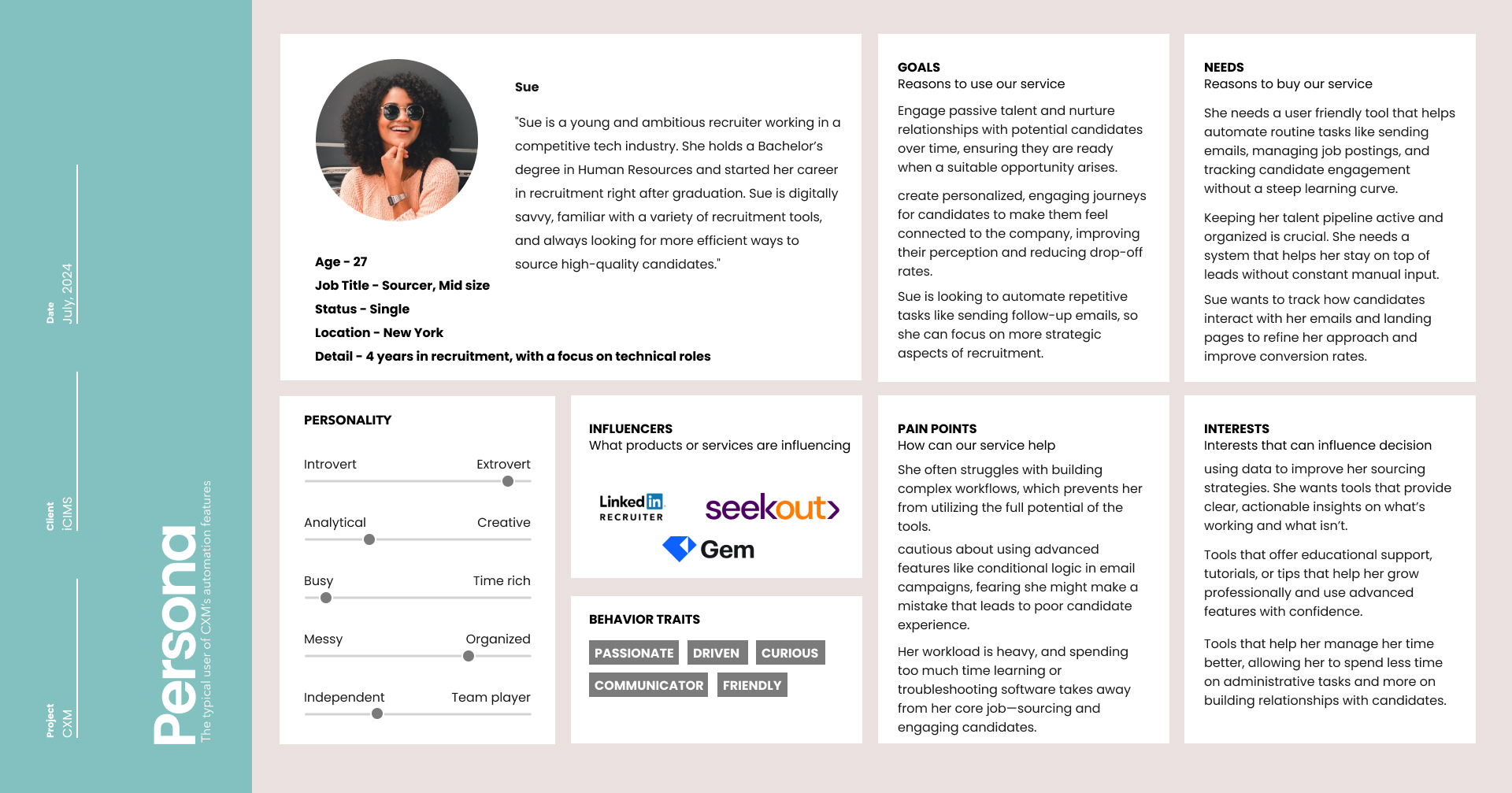
After analyzing the data, I synthesised the findings into manageable reference points, beginning with user personas and completing the contextualising with empathy maps. Contextualising the target audience’s experiences with the current workflow builder will help meet their needs and goals and allows me to mould a palpable representational persona. Formed strictly from my research and interview quotes, I synthesised a user persona applying reference tools like Claritas Prizm, and Myers Briggs.
Empathy Map
After analyzing the data, I synthesized the findings into manageable reference points, beginning with an empathy map. Created from interviews, secondary research and observational analysis, the empathy map helped contextualize future users’ encounters with the Workflow Builder & Engagement Scoring features in CXM.
User persona & story
Contextualising the target audience’s brushes with sourcing and how a potential technology could meet their needs and goals allows me to mould a palpable representational persona. Formed strictly from my research and interview quotes, I synthesized a user persona applying the Myers-Briggs Framework.
Goals & Features
👤 User Goals
-
Users want an intuitive interface to easily build, edit, and manage automated workflows to engage candidates. They expect clear options to use pre-made templates and quickly customize journeys without needing in-depth technical knowledge.
-
Users need tools to automate routine tasks such as sending follow-up emails, setting reminders, and scoring candidate interactions. Their goal is to focus on strategic sourcing rather than repetitive administrative tasks.
-
Recruiters want to ensure candidates have a smooth, personalized journey from the moment they enter the pipeline, enhancing the employer brand. Their goal is to increase candidate retention and minimize drop-offs through well-timed, relevant communication.
-
Users need real-time insights into candidate engagement and campaign effectiveness. The ability to quickly see how many candidates open emails, click links, or engage with content is crucial for refining future campaigns.
-
Being able to access the tool on both desktop and mobile devices helps users manage campaigns and candidates on the go, especially for fast-paced recruitment environments.
💼 Business Goals
- By automating key tasks and offering easy-to-use marketing automation tools, businesses aim to increase the productivity of recruiters and sourcers, reducing time-to-hire.
- Companies want a streamlined way to keep passive talent engaged over time, reducing the need to constantly search for new candidates for every open position. This reduces overall recruitment costs and improves quality-of-hire.
- A seamless recruitment marketing experience contributes to a stronger employer brand. Businesses aim for candidates to associate a positive, engaging experience with their brand, leading to a competitive advantage in talent acquisition.
- Businesses seek actionable insights from recruitment marketing data. They aim to use CXM to make informed decisions about sourcing strategies, optimizing candidate outreach, and improving overall hiring effectiveness.
💻 Technical Specifications
-
CXM needs to seamlessly integrate with existing CRM (Customer Relationship Management) and ATS (Applicant Tracking System) platforms, ensuring smooth data flow and minimal disruption to users’ current workflows.
-
The system should support the creation, storage, and editing of email and landing page templates. A template library allows users to quickly deploy common workflows without starting from scratch each time.
-
CXM must offer flexibility in building automated workflows, allowing users to define specific triggers, actions, and conditions based on candidate behavior, such as email opens or job application submissions.
-
CXM should include robust reporting features, giving users real-time data on campaign performance, including email open rates, click-through rates, and candidate journey metrics. Users should be able to filter and export this data as needed.
🙏 Common Goals
-
From a UX perspective, the goal is to simplify complex workflows in a way that both non-technical recruiters and advanced users can quickly understand. Business and technical teams aim to offer rich features while keeping the interface easy to navigate.
-
One common goal is to ensure that the tool is easy to adopt for new users. This requires building in educational resources, tooltips, and an intuitive onboarding experience. For the business, this goal supports faster rollout and increases user satisfaction, reducing churn.
-
The UX goal is to ensure that automated processes still allow for personal, human interaction with candidates. From a business and technical perspective, this means striking a balance between efficiency and maintaining a personalized candidate experience.
-
Ensuring the design follows accessibility guidelines (WCAG 2.1) is essential for a wide range of users, aligning technical, UX, and business goals around inclusivity. This also ensures compliance with legal standards, which is a key business requirement.
-
Creating a consistent user experience across all devices—whether on a desktop, tablet, or mobile—aligns with both UX and business goals by supporting recruiter flexibility and ensuring full access to CXM’s features on any platform.
Product Feature Priorities
-
Prioritize an intuitive, user-friendly interface that allows recruiters and sourcers to easily build, customize, and manage automated workflows. This should include access to pre-made templates.
-
Ensure smooth integration with existing CRM and ATS platforms to minimize disruptions to users’ current workflows and enable seamless data sharing. This integration will be crucial for recruiters who rely on these systems for candidate management.
-
Develop robust reporting features that provide real-time insights into campaign performance, allowing users to track email opens, clicks, and overall candidate engagement. Easy-to-access and exportable data is essential for making informed decisions.
-
Focus on automating repetitive tasks like follow-up emails and lead nurturing, while ensuring that the system allows for personalized candidate interactions. Maintaining a balance between efficiency and a human touch is key to improving candidate engagement.
- Implement an intuitive engagement scoring system that automatically tracks and scores candidate interactions, such as email opens, link clicks, and form submissions. The scoring should be easy to understand and manage, with options for users to adjust criteria based on specific recruitment needs. The system must allow recruiters to identify high-potential candidates quickly, without requiring in-depth knowledge of marketing automation. Simplifying engagement score management at a global or workflow level will help increase user adoption and reduce fears around misconfiguring campaigns.
User persona & story
How Might We?
To create the physical product, I first acknowledged business aims and necessary features for user goals and then formulated a main architectural plan. The main architectural goals were developed by positing How Might We statements. These statements allow the ability to meet user needs while considering tasks and mappings of potential technology.
The particularly relevant How Might We statements followed the needs of the Sue persona, with business goals considered.
- How might we help first-time CXM users feel confident enough to setup and manage an automation?
- How might we create for users a more accessible and usable automation builder experience?
- How might we help our users identify engaged, relevant talent quickly and efficiently?
User Flows
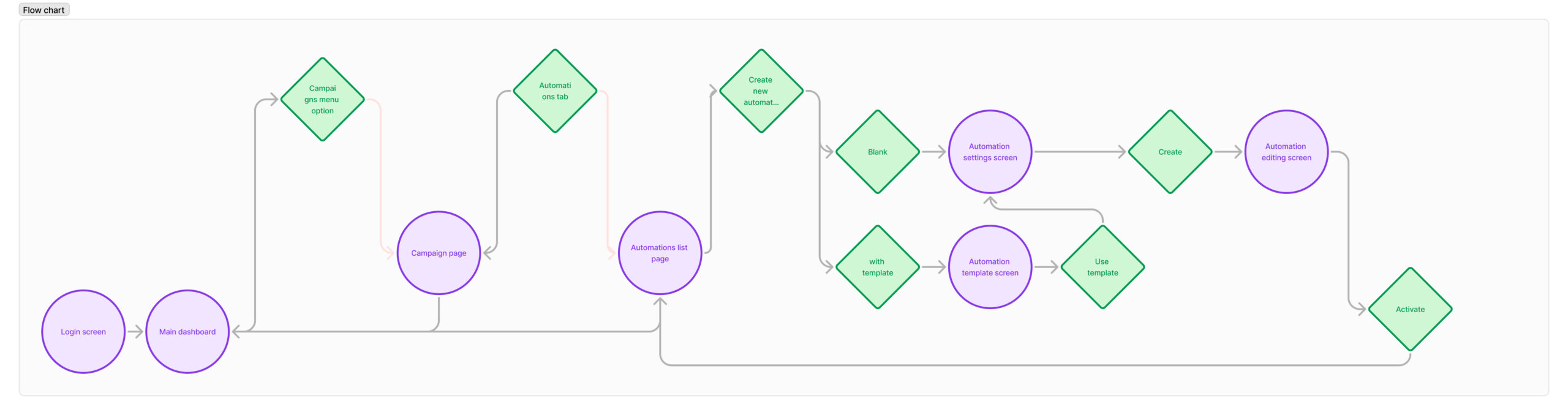
Regarding the established architectural goals from the “How Might We” exercise, I identified tasks and user flows that would meet our user persona’s needs, desires, and goals within the context of her journey. I then applied these flows to design a basic userflow to help illustrate and brainstorm some of the potential screen solutions before moving into UX Design.
UI Designs
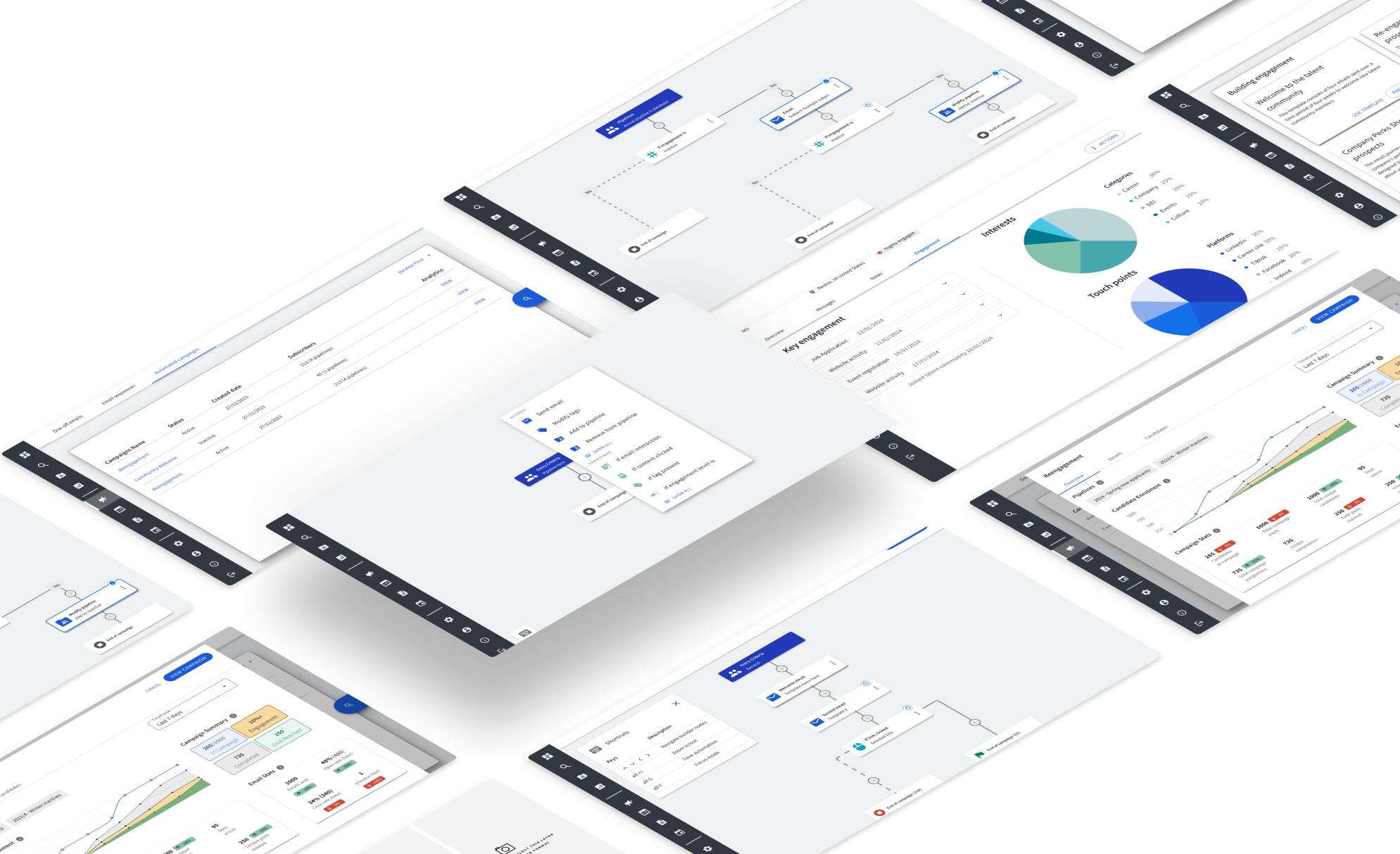
prototype & testing
After an initial wireframes were created, we quickly moved to a high-fidelity prototype. Testing was carried out with a selected group.
usability tests using the hi-fidelity prototype of CXM were conducted.
There were seven tasks created to test the usability and critical objectives of the feature including,
- Creating a new workflow
- Editing an existing draft workflow
- Using a workflow template
- Addressing errors within a workflow
- Activating a workflow
- Reviewing workflow analytics
The test goals included the following:
- Identify any critical errors or incomplete task flows within the app
- Evaluate if the user comes across challenges with navigation or design
- Understand successful task flows and identify helpful UI features
- Assess to see that relevant information is in the right place at the right time
- Can the user setup and activate a workflow
- Can the user edit an existing draft workflow
Design iterations
Original design, the goal was to improve this design without sacrificing any functionality and taking into consideration all research.
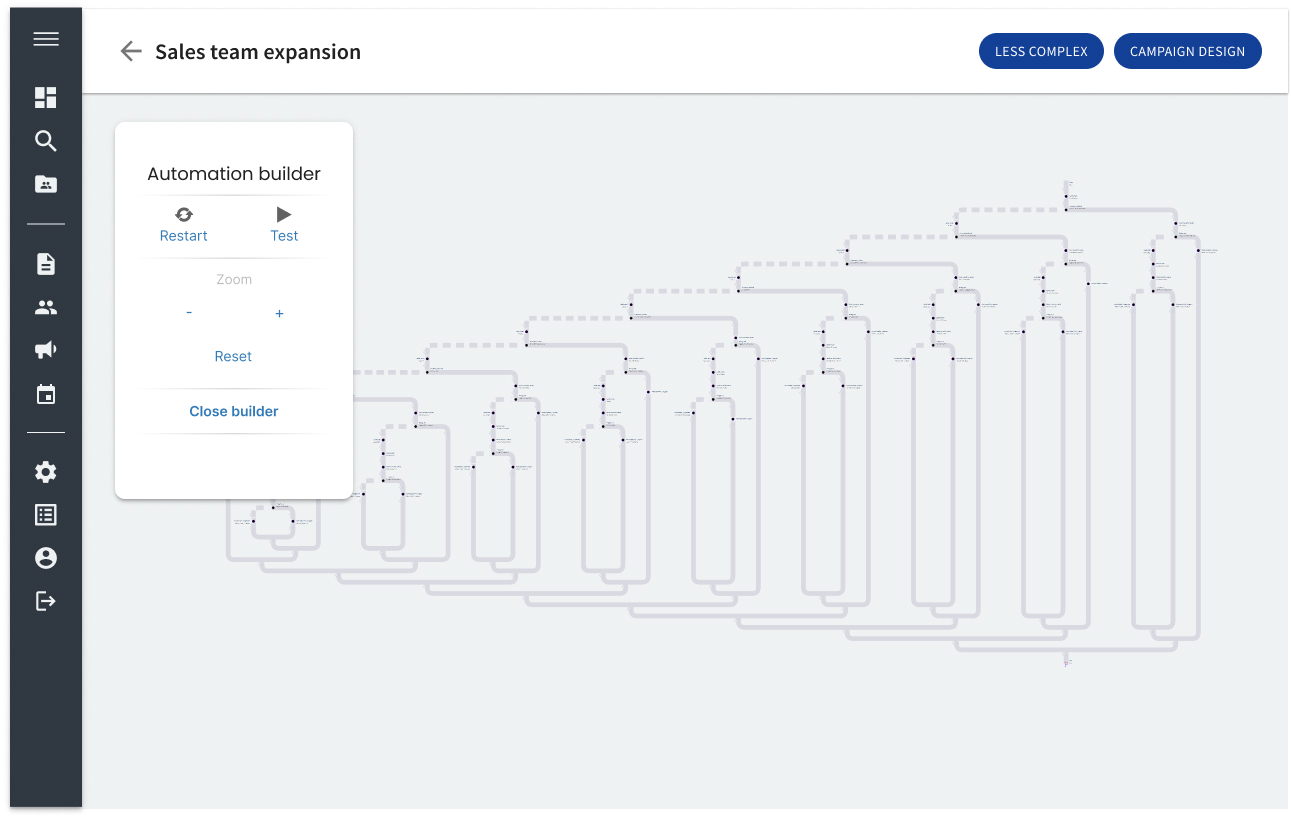
first iteration
I had seen grid based systems like the above within role playing games. I thought the grid aspect might make the experience more easily digestible and that by decoupling the Yes/No aspect of the decision nodes that it would make it easier to design a simple positive candidate flow. However after having to explain the concept in-depth to my peers and to users of customer xero, I realised it was overly complex, not mobile friendly and very confusing.

second iteration
I had seen grid based systems like the above within role playing games. I thought the grid aspect might make the experience more easily digestible and that by decoupling the Yes/No aspect of the decision nodes that it would make it easier to design a simple positive candidate flow. However after having to explain the concept in-depth to my peers and to users of customer xero, I realised it was overly complex, not mobile friendly and very confusing.
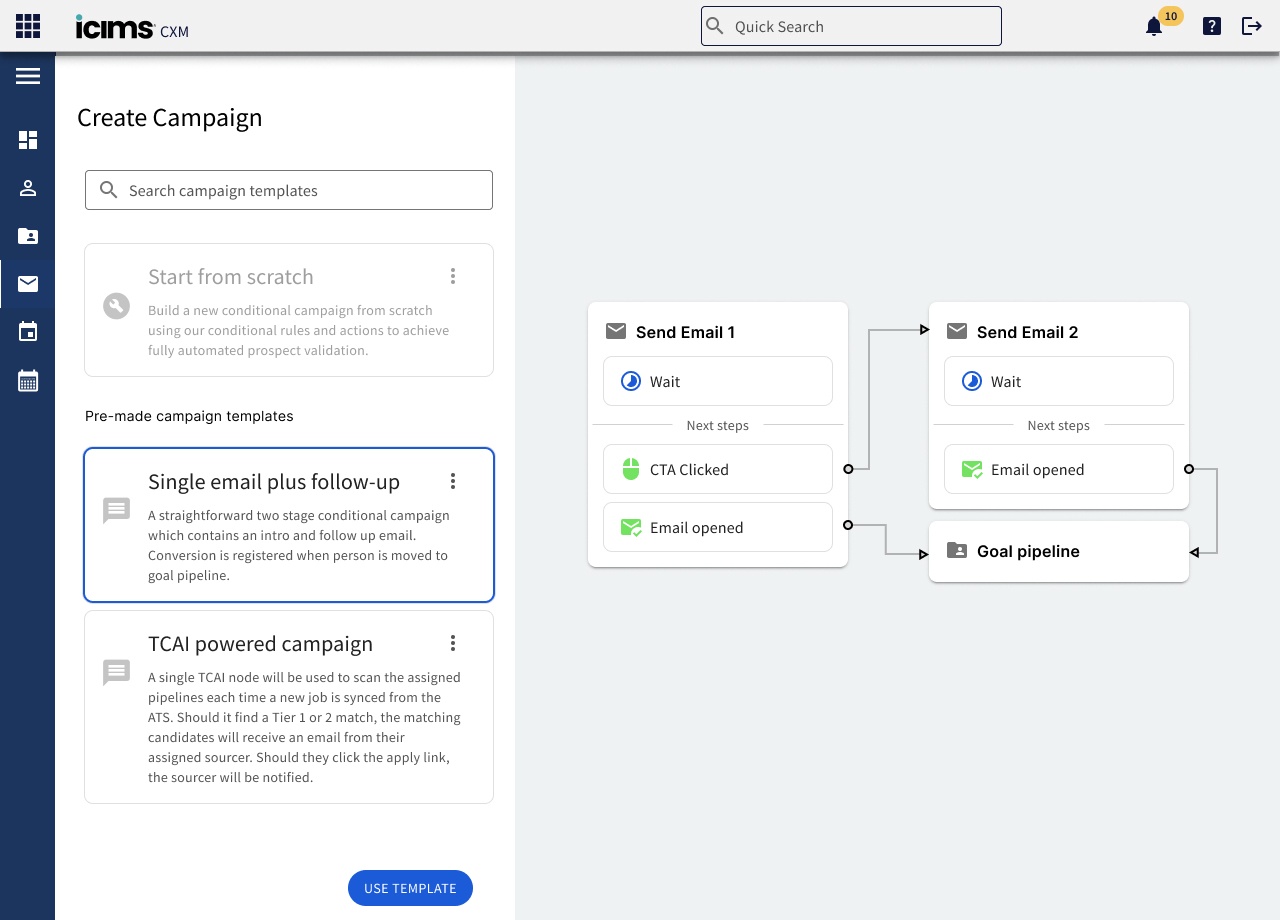
Third iteration
Expanded out the view for the horizontal scroll, this is first version we started to integrate the visual idea of funnels into the builder, as well as keeping context specific decisions grouped under associated actions. I think this helped alleviate some of the issues from the previous iteration by allowing for much more space for more complex flows, but still didn’t meet our criteria for readability and explain-ability for users.
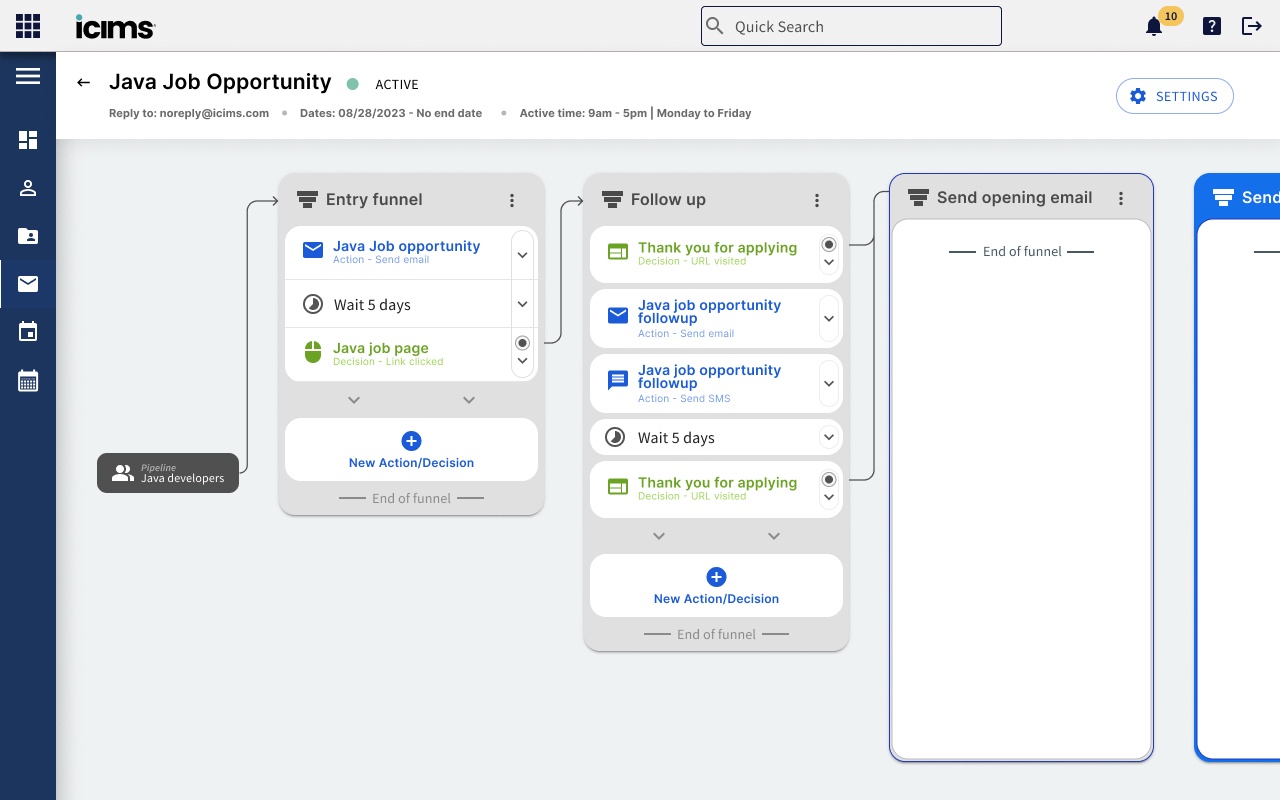
Fourth iteration
Cleaned up funnel view, we’ve tried to correct for a lot of wasted space on the previous iteration by removing the unnecessary pipeline entry marker, as well as experimenting with colour markers instead of arrows. This helped to add in being mobile friendly as we could use a carousel style navigation to swipe through on mobile. From initial reviews however, the layout of nodes and introduction of function style nodes (combined decisions) was going to be too confusing for new users.

Final iteration
Bringing back the arrows while retaining colour tagging has helped bring some readability back to the flow while still accounting for mobile navigation. We also fleshed out the goal funnel to become part of the main campaign flow, we think this will help beginner users start to understand what they want to get out of a campaign, as well as create great opportunities for analytical data for a dashboard.

Design comparison
Both designs represent the same campaign properties and outcomes.
Results of testing
Of the six tasks, all task flows were completed sufficiently and with expediency by all participants. All participants were impressed with the visual design, design patterns and the second-hand nature of the navigation.
Each stated that this application would meet their individual needs and was successful in reaching their end goal.
There were many valid and interesting suggestions:
- Add language variations on templates.
- Be able to send SMS messages from the workflow builder
- Be able to duplicate workflows along with the content.
- Be able to fully test workflows.