
onboarding app
The PIP was a revolutionary biosensor that helped you really learn to relax, improve your performance in any aspect of your life and combat stress. It was available for both iOS and Android, the PIP detected whether you are stressing or relaxing in real time.
The PIP achieved this through biofeedback which is a process where the user learns to control an aspect of their physiology that they are not usually aware of. By providing continuous information on whether or not they are “doing the right thing”, the user evolves a personal strategy that produces the desired result.
identified ux solutions
website, app onboarding, packaging
website improvements
As part of the User Experience revamp, I was tasked with building a brand new website to match our new branding and new user experience. It was a requirement to not interfere with the existing website e-commerce function.
improved packaging
The User Experience of The Pip begins on the website but continues when their purchase arrives. For this I researched and designed new consumer packaging alongside a 7 day starting guide.
new apps
It was agreed that to improve the adoption of The Pip device and to hold onto that adoption, two new apps were required. An onboarding app and a new audio experience app. I was to provide designs for both.
onboarding app
pip hub
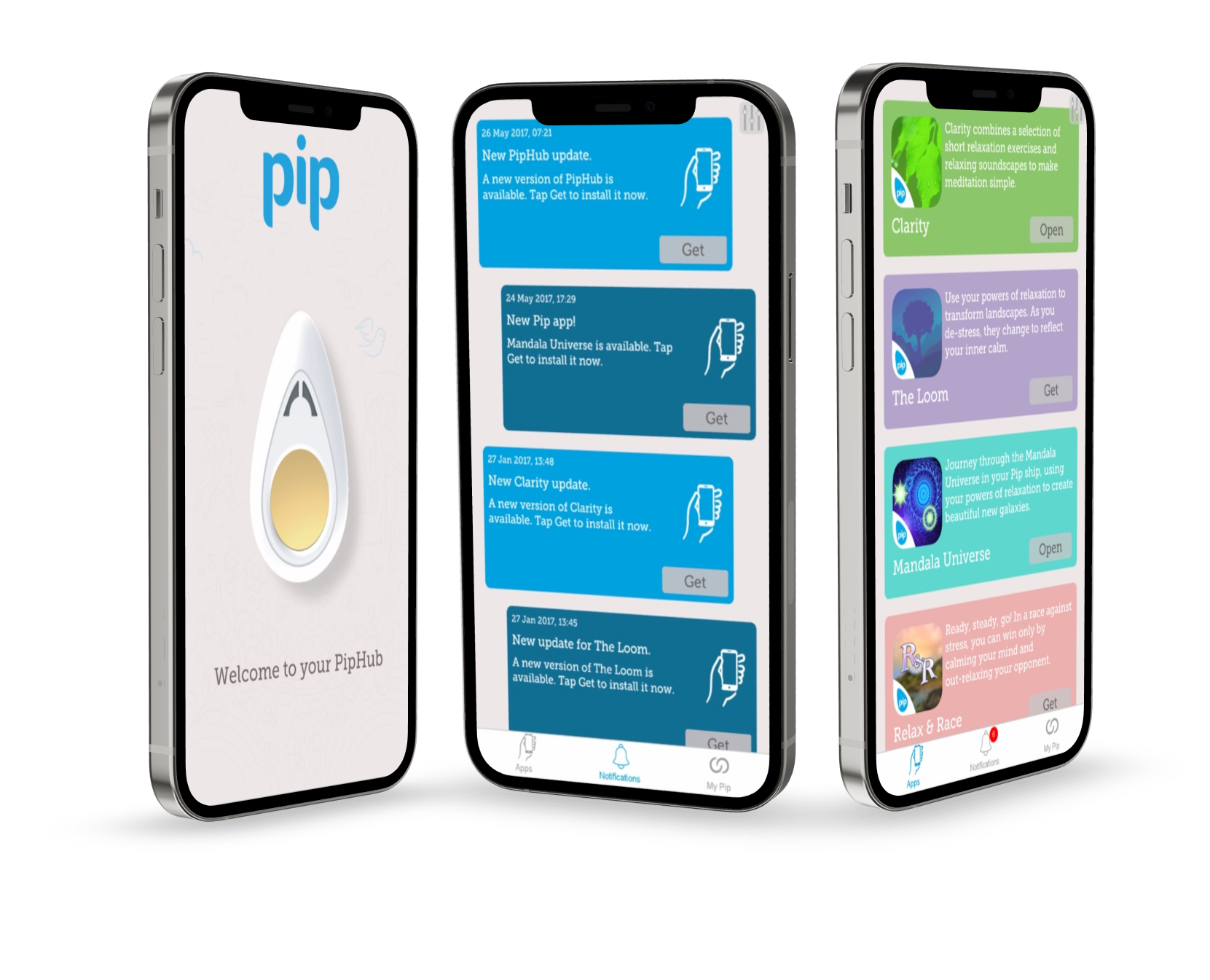
the challenge
Users lack a consistent onboarding experience across the companion apps for The Pip. This means not only lower adoption, but also a lack of stickiness. The cumbersome nature of the device onboarding is detrimental to the product overall.
the Objective
Improve adoption, satisfaction and perceived value for new Pip users, increasing usage of new flagship app “Clarity”.
the solution
Research and design a new onboarding app for The Pip to work alongside improvements to the Website and Commercial packaging.
Research
I used two sources for research purposes, anonymous usage data from the “My Pip” cloud service, which is an analytical service for Pip users and also user interviews. Its worth noting that this research was carried out for a holistic review of the entire Pip user experience, from initial introductions via marketing, to purchase and usage. I have cherry picked items related specifically to the “Pip Hub” project.
MY PIP FINDINGS (Quantitative)
My objective in examining My Pip data was to get an understanding of user behaviors. What I discovered was;
- Users tended to use the company’s oldest app first.
- Their usage patterns lacked order, meaning they didn’t have a set routine.
- After the first week usage dropped off a cliff.
- Users were not downloading the company’s most advanced app.
USER INTERVIEWS (QUALITATIVE)
I interviewed 30 Pip customers around their experiences with the device, particularly focusing on the first 4 weeks of usage. Participants varied in age and gender. Some of the main comments of note were.
“I find the fact I have to pair my pip with multiple apps to be very cumbersome, I would like to pair it once, as I do with my other devices.”
“I just didn’t know what to do with it after the novelty wore off.”
“The apps that show up on the play store seem very dated, stress tester in particular is quite dated.”
“I want to log into the MyPip service once, not every time I try another app”
Notable trends with the interviewees were:
- Displeasure with bluetooth pairing multiple times.
- Displeasure with having to log into MyPip service for each app separatley.
- They were unaware of the company’s most recent app, with no notification to download.
- They would like a hub for all of their apps and data.
Needs
- Centralised hub for apps
- Single bluetooth pairing experience
- A more guided experience when onboardin
Pains
- Multiple bluetooth pairing
- Multiple MyPip logins
- No notifications about new apps
- Not knowing hows to start using the pip, forming a habit
Desires
- A singular experience
- Onboard to one app, pair with one app.
- To receive notifications about new Pip experiences.
SYNTHESIS
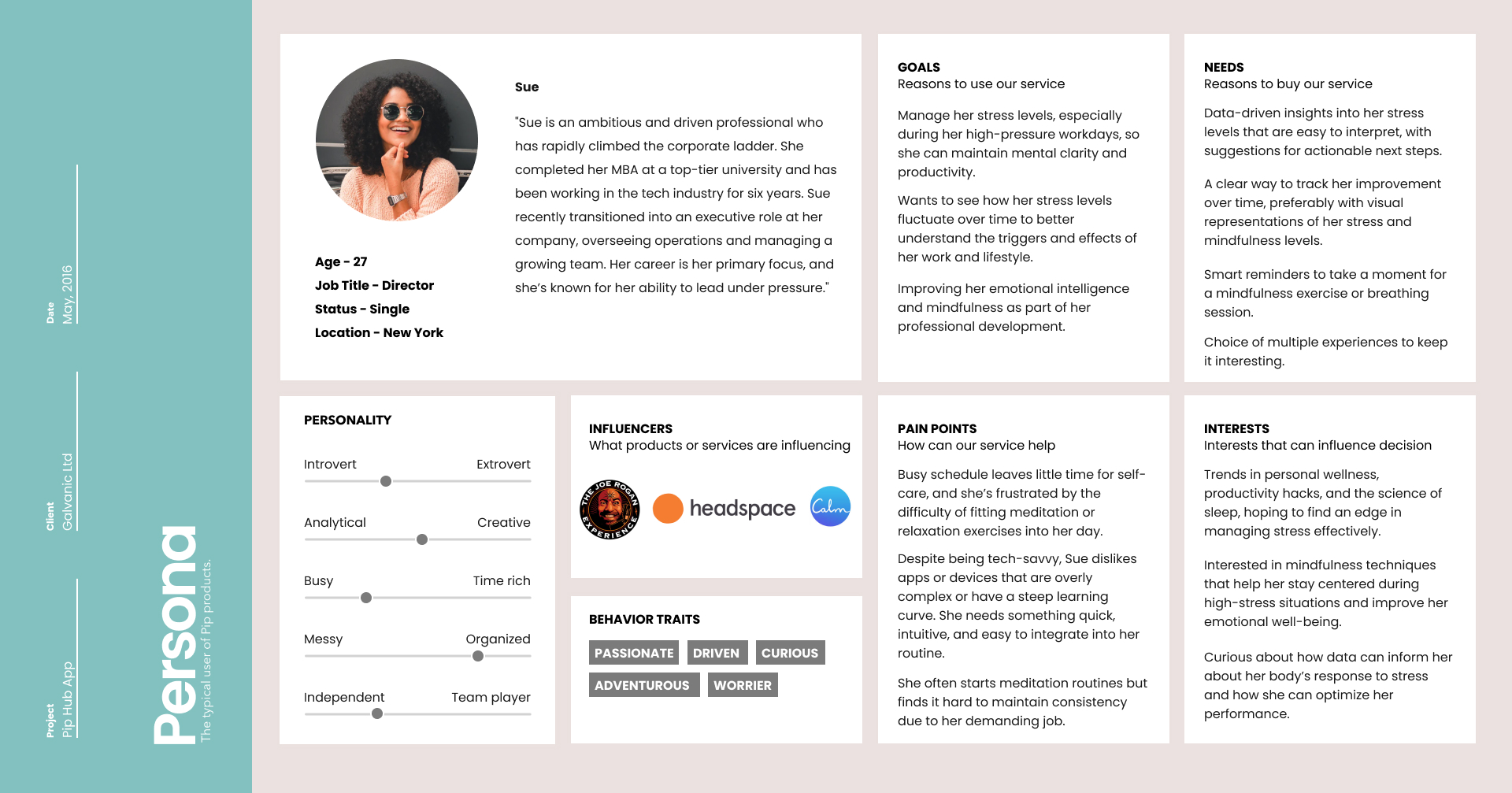
After analyzing the data, I synthesised the findings into manageable reference points, beginning with user personas and completing the contextualising with empathy maps. Contextualising the target audience’s experiences with stress management exercises will help meet their needs and goals and allows me to mould a palpable representational persona. Formed strictly from my research and interview quotes, I synthesised a user persona applying reference tools like Claritas Prizm, and Myers Briggs.
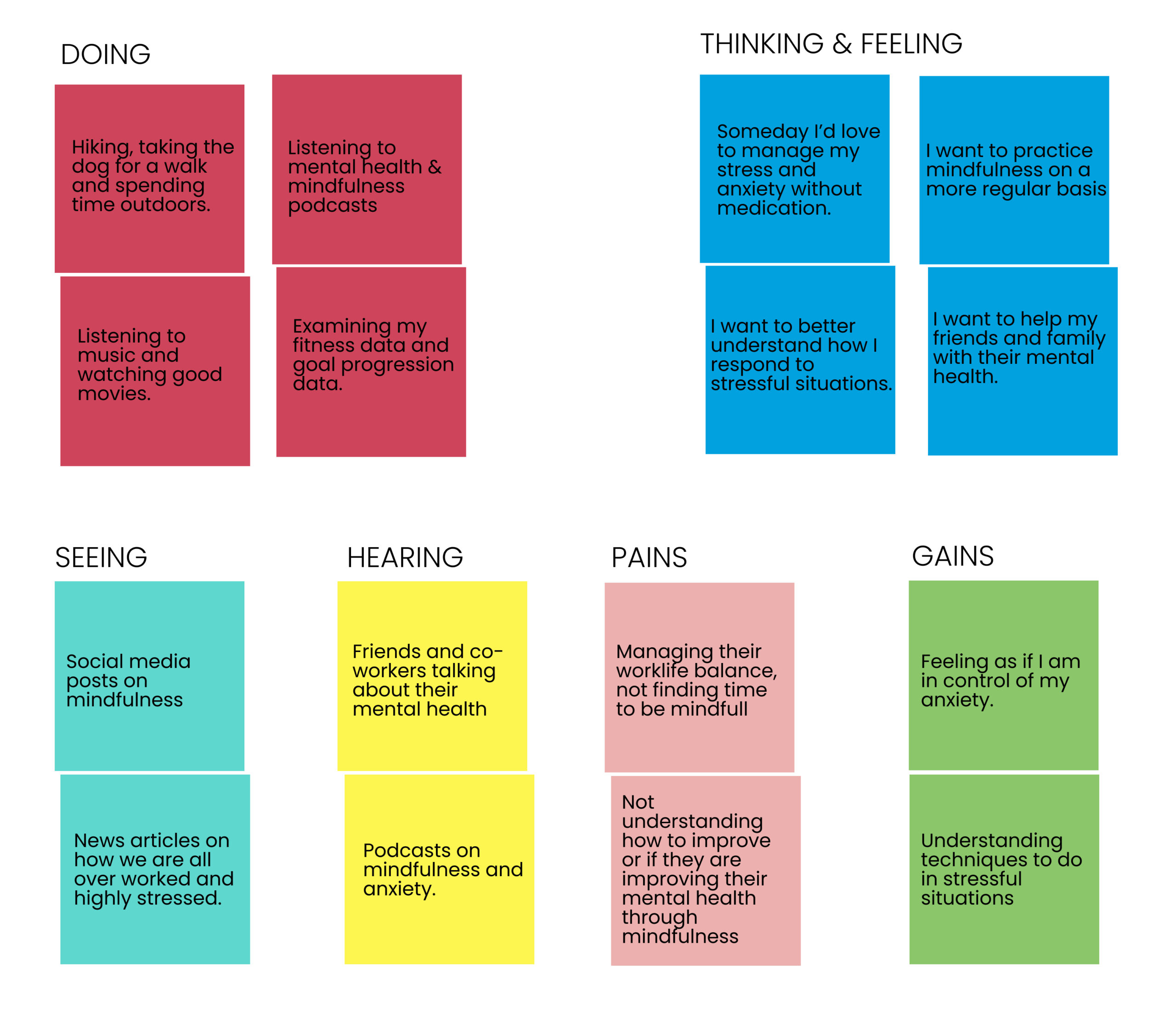
User persona & story
Contextualising the target audience’s brushes with stress management and how a potential technology could meet their needs and goals allows me to mould a palpable representational persona. Formed strictly from my research and interview quotes, I synthesized a user persona applying the Myers-Briggs Framework.
Goals & Features
👤 User Goals
- Have quick access to simple stress management
- Feel confident in mindfulness and meditation
- Simple learning curve to bypass barrier of entry
- Know all details of using The Pip’s mindfulness techniques, so there’s no risk of failure
- Use easy to understand data to optimise stress management.
- Learn to identify and manage stress initiatiors
💼 Business Goals
- Become an industry leader in the stress management space
- Create new logo, branding and UI design to position app in market
- Utilize technology to optimize stress management for every target persona
- Sell products through external vendors
- Keep consumer up to date about new applications
- Reduce to the number of devices being returned by 50%
💻 Technical Specifications
- Ability to login and sign up to My Pip
- Account creation and control
- UI that has ability to deliver a full onboarding experience to The Pip
- UI that aligns with company branding
- Accessible and usable to all groups
🙏 Common Goals
- Have a delightful mindfulness experience
- Develop new mindfulness techniques for users
- Download new app experiences easily
Product Feature Priorities
- Logging in and setting up a new My Pip account.
- Being able to easily pair their Pip device with the new app.
- Access to the My Pip profile page (Not a part of the APP, framed experience)
- Full onboarding experience, explaining to the user what the Pip is and what it does alongside a forced download of our flagship app.
- Receive notifications about new apps being added.
User persona & story
How Might We?
To create the physical product, I first acknowledged business aims and necessary features for user goals and then formulated a main architectural plan. The main architectural goals were developed by positing How Might We statements. These statements allow the ability to meet user needs while considering tasks and mappings of potential technology.
The particularly relevant How Might We statements followed the needs of the Emma persona, with business goals considered.
- How might we help first-time Pip owners feel confident in their setup and initial sessions?
- How might we create for users a more accessible and usable plant buying experience?
- How might we help plant hobbyists visualize and design their living spaces?
User Flows
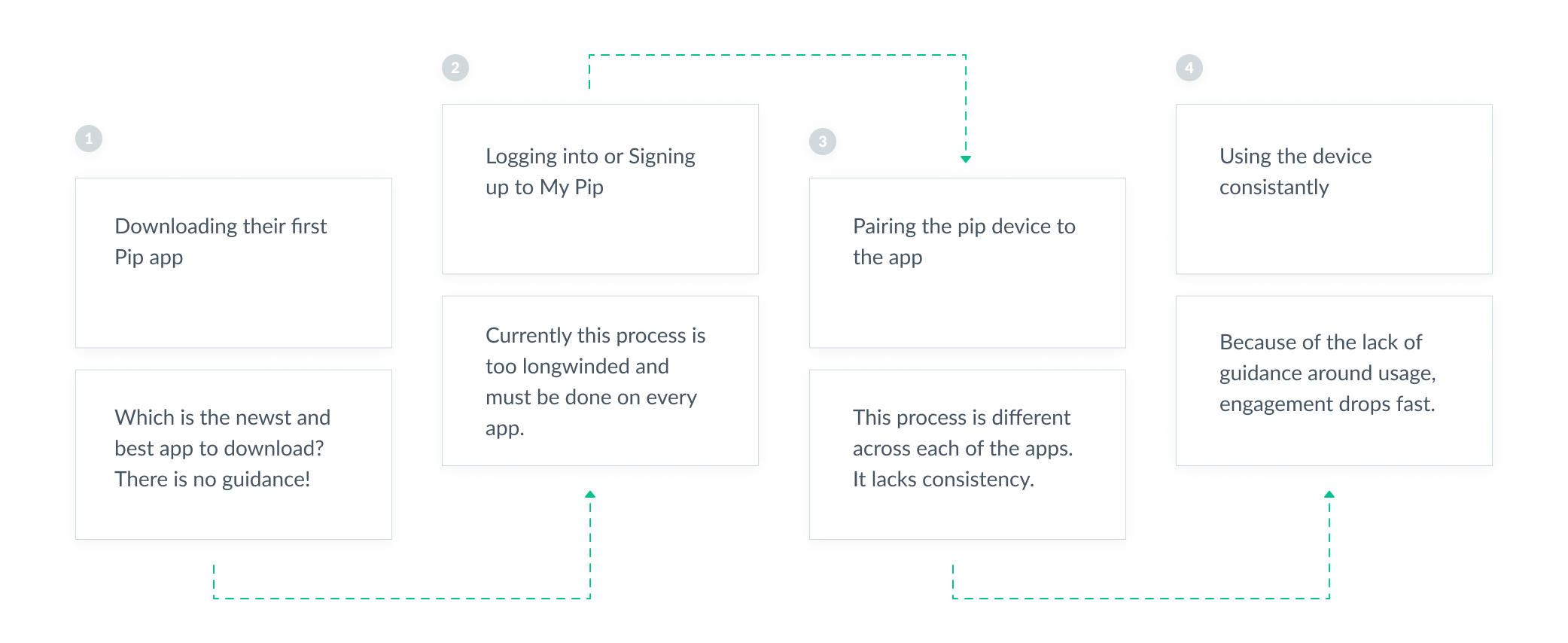
Regarding the established architectural goals from the “How Might We” exercise, I identified tasks and user flows that would meet our user persona’s needs, desires, and goals within the context of her journey. I then applied these flows to uncover an application sitemap to provide the most practical route to those goals. Leaving room for iteration, I designed a basic userflow to help illustrate and brainstorm some of the potential screen solutions before moving into UX Design.
Final UI Designs
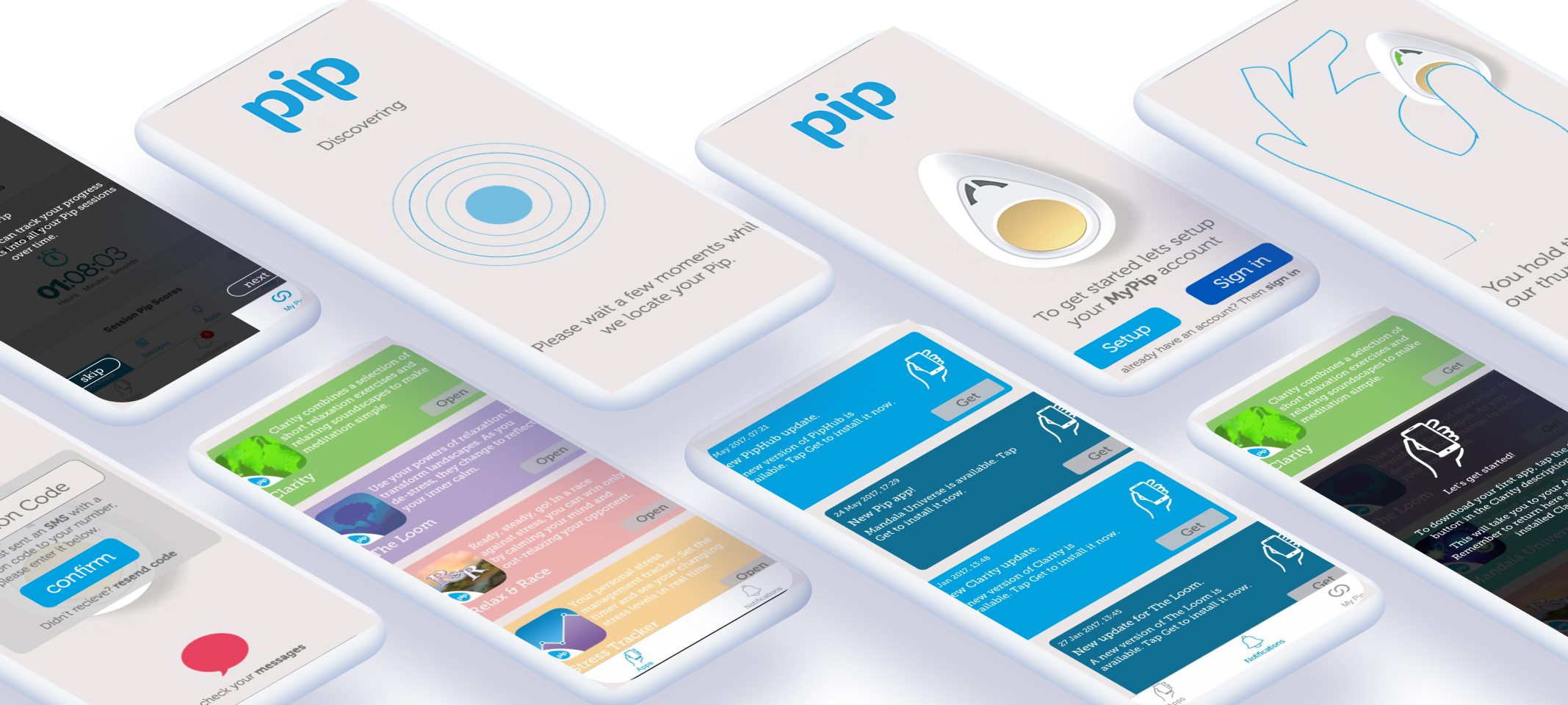
prototype & testing
After an initial paper wireframe was created, we quickly moved to a high-fidelity prototype. A Usability Test Guide was written and proposed. Participants from different walks of life were then recruited to take part in a Zoom virtual usability test.
Four usability tests using the hi-fidelity prototype of the pip hub App were conducted.
There were seven tasks created to test the usability and critical objectives of the feature including, creating an account and logging in, finding information about a specific plant, favouriting/adding a plant, utilizing the AR feature to purchase a plant, discovering information about plant care, and learning how to add plants to a living space.
The test goals included the following:
- Identify any critical errors or incomplete task flows within the app
- Evaluate if the user comes across challenges with navigation or design
- Understand successful task flows and identify helpful UI features
- Assess to see that relevant information is in the right place at the right time
- Opening and actioning notifications
Comments from testers
“Signing into My Pip once and once only is a god send. Also the new signup process is a massive improvement”
“Really liking the new pairing experience, feels a lot more intuitive. Also, only having to pair to this one app feels great.”
“After the great onboarding, I really, for the first time feel like I fully understand The Pip.”
“The fact that it downloads the Clarity app first, really gives you the best experience first time. Great app.”
“Really like that this is the only Pip app I ever have to worry about being able to find, also can be added to my home screen.”
Testing review
Of the five tasks, all task flows were completed sufficiently and with expediency by all participants. All participants were impressed with the visual design, design patterns and the second-hand nature of the navigation.
Each stated that this application would meet their individual needs and was successful in reaching their end goal.
There were many valid and interesting suggestions:
- Add template mindfulness schedules, with varied apps for each session.
- Access fitbit data to pro-actively prompt a session.
- Add some sort of message board for pip users to discuss mindfulness.
- Have some smaller app experiences native to the Pip Hub App
All of these were really great suggestions, one which was expanded on, but never developed was the idea of small, single experience apps, native to Pip Hub, which you can see designs below.
